Preface
I didn’t set out to write a book about performance. I set out to understand why our Spring Boot service, which worked beautifully at 200 requests per second, fell apart at 800. The profile said GC. The GC logs said allocation pressure. The allocation flame graph said Jackson. Jackson said nothing was wrong. It took three of us, two late nights, and an embarrassingly simple fix — one misplaced annotation on a DTO — before the service was fine again.
That’s the story behind this book. Not theory. Not patterns. A single service, a single benchmark, and the discipline of asking the same question every time the numbers change: where did that win actually come from?
What This Book Is
This is a hands-on guide to making a Spring Boot 4 application fast under real load. We take CinéTrack — the monolith from Spring Boot 4 in Practice — and push it from its baseline throughput to roughly fifty times that over twenty-eight chapters. Every tuning chapter starts with a profile, identifies a real bottleneck, applies a change, and measures the gain side by side. Some chapters buy us 30%. Some buy us 3%. Some buy us nothing, and we say so.
The goal is not to teach you everything there is to know about Java performance. That’s a different book, and it’s longer. The goal is to teach you the measurement discipline, the handful of tuning knobs that actually move production numbers, and how to tell the two apart.
Who This Book Is For
Engineers who have built things with Spring Boot and now have to make those things fast. You know how to wire up a REST API, configure Hibernate, and read a thread dump. You’ve heard of virtual threads and ZGC. You want to know which ones matter for your app, and which ones the internet is selling you harder than the evidence warrants.
You don’t need to be a JVM internals expert. You do need to be willing to run a profiler before you reach for a stack overflow answer.
How to Use This Book
Chapters 1 through 6 build the measurement discipline. Read them in order — nothing in the rest of the book makes sense without them. If you skip them, you will tune by vibes. Tuning by vibes is how production apps get slower with every release.
Chapters 7 through 14 cover the JVM and Spring framework layer. Chapters 15 through 22 cover the database and the data-heavy parts of the request path. Chapters 23 and 24 add Kafka to the monolith and tune it. Chapters 25 through 27 zoom out to queueing theory, capacity planning, and GraalVM native image. Chapter 28 runs the final benchmark and tells you, honestly, where the 50× actually came from.
A Note on Spring Boot 4.0.5 and Java 21
All examples use Spring Boot 4.0.5 on Java 21 LTS. Spring Boot 4 defaults to virtual threads via Project Loom, which changes how you think about concurrency. We cover that explicitly — and we measure it, because “virtual threads are faster” is true about 70% of the time and loudly false the other 30%.
The Code
Every chapter has a companion project in the code/ directory. The code/cinetrack/chapter-01/ snapshot is a pointer to the final CinéTrack from Spring Boot 4 in Practice — the baseline we tune from. Each subsequent chapter adds its cumulative state. By code/cinetrack/final/, CinéTrack runs at roughly fifty times its chapter-1 throughput on the same hardware.
git clone https://github.com/umur/spring-boot-performance-book-example
cd spring-boot-performance-book-example/final
docker-compose up -d
./run-benchmark.sh
Reproducibility is the contract. Pinned versions. Pinned hardware profile. If you can’t rerun the numbers in this book, the book isn’t doing its job.
Acknowledgments
The bugs are mine. The good ideas are everyone else’s, often without attribution because I forgot where I first heard them. If you recognize one of yours, please write to me; I would like to credit you in the next edition.
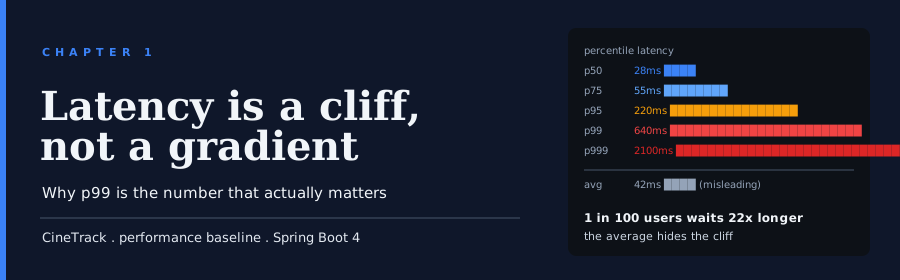
1 Latency is a cliff, not a gradient
1.1 Overview
“Even rare performance hiccups affect a significant fraction of all requests in large-scale distributed systems.”
Jeff Dean and Luiz André Barroso, The Tail at Scale (2013)
A team I know watched their dashboard during a product launch. Average response time: 180ms. Flat line. Green everywhere. Their VP walked in, saw the graph, and smiled. The support queue was filling up with a different story. Users were seeing page loads that took eight seconds, ten seconds, sometimes timing out entirely. Not most users. But enough of them.
The dashboard wasn’t broken. It was showing an average, and an average of a latency distribution is a number that almost no request actually experiences. That night they learned what a fat tail looks like, what p99 is, and why the most important number in performance engineering is the one that isn’t on the executive’s dashboard.
This chapter is that lesson, written down. We’ll look at what a real latency distribution looks like in production. Why averages lie. Which percentiles actually matter. How to measure them without your histogram eating all your memory. And why your load generator is probably quietly under-reporting the worst part of your system.
In this chapter, you will:
- Understand why response-time averages hide production failures
- Learn to read a latency distribution and identify its tail shape
- Know what p50, p99, p999, and max actually cost to measure
- See why your load generator probably lies to you, and what to do about it
- Set the first concrete latency targets for CinéTrack that the rest of the book tunes against
1.2 Why averages lie: the long tail of production traffic
Most of what you measured in school came from a bell curve. Heights. IQ scores. The distance your dart lands from the bullseye. The average of a bell-curve distribution is a sensible number. It sits in the middle. Most observations are near it. A few are far away, in roughly equal numbers on each side.
Production latency does not live on a bell curve. It lives on a distribution with a sharp left wall (you can’t answer a request in negative time), a dense cluster near a typical fast response, and a long, heavy tail stretching to the right, toward one-second, ten-second, and timeout-level outliers. The shape is closer to log-normal than normal. Tools that assume Gaussian behavior will mislead you the moment you use them.
Here is a simple example. Your service handles one million requests in an hour. 990,000 of them finish in 40ms. 10,000 of them finish in 2 seconds, because of a database stall, a garbage-collection pause, or a slow downstream call. What’s the average?
(990,000 × 40ms + 10,000 × 2000ms) / 1,000,000 = 59.6ms59.6ms. Sounds great. That will make a lovely chart. It will also completely hide the ten thousand users who saw a two-second page load. One user in a hundred had a terrible time. Your average never noticed.
Now make it worse. Your database gets a little slower. The 40ms requests stay at 40ms. The slow requests move from 2s to 4s. The average creeps to 80ms. The dashboard barely twitches. A hundredth of your traffic just doubled in latency, and the metric that everyone is watching moved by 20ms.
1.2.1 Where the tail comes from
Real systems grow tails for predictable reasons:
- GC pauses. Even G1 and generational ZGC, with their sub-millisecond pause goals, hit the occasional safepoint stall long enough to clip a tight request budget.
- Lock contention. A single synchronized block becomes a queue the moment concurrent traffic exceeds what the lock can process.
- Cache misses. A main memory fetch costs 100x more than an L1 hit. An SSD read costs 100,000x more.
- Database stalls. A
transactionidlock held by an inconvenient transaction. A checkpoint. An autovacuum. A query that planned differently today. - Slow downstream calls. Your service is fast. The TMDB call it makes has a 1% probability of being slow. Multiply across every external hop.
These events are rare by design. They don’t happen on most requests. They happen often enough that, at a million-request-per-hour scale, your support queue fills with stories of nine-second page loads.
1.2.2 What the user remembers
There’s a finding from web UX research worth pinning to the wall: users don’t average their experience. They remember the worst load they saw that day and decide, from that one data point, whether your product is slow. The average is a number you make up to feel better about a distribution that has teeth.
The rest of this book is about that distribution. Averages will still appear in graphs, because they compress nicely. They will not make decisions.
So if the average is the wrong number, what’s the right one?
1.3 Percentiles, and why p99 is the number that matters
A percentile is the answer to a question about ordering. Sort your observations from fastest to slowest. The p99 is the latency at position 99%. Ninety-nine requests out of a hundred were faster. One was slower.
p50 is the median. Half your users were faster, half slower. This is often roughly the same as the mean for fast, tight distributions, and nothing like the mean when the tail is fat.
p95 is “95% of users had it at least this fast.” A reasonable product-level target for a snappy interaction.
p99 is where the honest latency conversation begins at scale. If you serve a million requests a day and your p99 is 500ms, you have ten thousand requests a day that took half a second or longer. That’s ten thousand small annoyances, many of them concentrated on the users who click around the most (who are usually your best users).
p999 (99.9th percentile) is one request in a thousand. At a million requests a day, that’s still a thousand users a day with a bad experience. p999 is where you set alerts, not SLOs.
max is one observation. It can be any GC pause, any network hiccup, any cosmic ray. Interesting for debugging. Useless for goals.
1.3.1 The arithmetic of nines
People underestimate how much traffic sits in the tail of a high-traffic service. A table helps:
| Traffic per hour | p99 users per hour | p999 users per hour |
|---|---|---|
| 10,000 | 100 | 10 |
| 100,000 | 1,000 | 100 |
| 1,000,000 | 10,000 | 1,000 |
| 10,000,000 | 100,000 | 10,000 |
If CinéTrack hits a million requests an hour at peak, “my p99 is slow” means ten thousand people per hour getting the slow version. A manager who doesn’t know what p99 means sometimes reads “1%” and thinks “tiny problem.” It’s not a tiny problem. It’s the size of a small town.
1.3.2 Percentiles compound, which is the unfair part
Here’s the inconvenient math. Your request to CinéTrack might touch five internal components: the HTTP handler, the authentication check, the database, the Redis cache, the TMDB downstream call. If each one has a 1% chance of being slow, the combined probability that at least one is slow on a given request is:
1 - (0.99)^5 ≈ 4.9%The p99 of the whole request path is worse than the p99 of any single hop. You don’t get to add latencies component by component. You multiply reliabilities.
That math is the core insight of The Tail at Scale: as systems get wider, the tail dominates the user experience unless you attack it on purpose. Every additional RPC, every cache layer, every retry, adds tail risk. A wide system with a well-controlled p50 can still have a p99 that’s 20x the p50.
1.3.3 Reading the p50 to p99 gap
The ratio between p50 and p99 is a cheap diagnostic. A healthy system has a p99 between 2x and 5x the p50. When it climbs past 10x, the system is bimodal: most requests are fine, and a subpopulation is in some kind of slow path. Look for:
- A lock that half your requests take and the other half skip
- A cache that most requests hit and a minority miss
- A downstream call that’s slow for one customer, fine for the rest
- A GC pattern where some requests land inside a collection pause
A p99 that’s 20x the p50 is not a latency problem. It’s a design problem surfaced through latency.
1.3.4 What to set, what to alert on
A working rule of thumb, which you should then tune:
- Set SLOs at p99. This is the public promise. p99 < 200ms on the search endpoint.
- Alert at p999 over a fifteen-minute window. Long enough to smooth noise, short enough to catch incidents.
- Graph p50, p95, p99, p999 side by side. When the gap between p50 and p99 widens, something is pathological. That’s the first signal you’ll see before a bad day.
- Report max in incident postmortems only. It’s useful when you’re reconstructing what happened. It’s distracting on a normal-operations dashboard.
Warning
Never alert on p99 over a one-minute window in a low-traffic system. With few samples, p99 is noisy and will fire false positives. The shorter the window and the lower the traffic, the less a single percentile number can be trusted.
CinéTrack’s targets in later chapters are all expressed in percentiles, never averages. The rest of this book is going to beat on p99 on specific endpoints, and sometimes p999 when we’re making the case that tail behavior changed.
So we know which number matters. How do we measure it without blowing a gigabyte of memory on raw samples?
1.4 Latency histograms and HDR histograms
To compute a p99, you need enough samples to estimate the 99th percentile honestly. The simplest way is to store every latency observation in a list and sort it. This works. It also uses memory proportional to traffic, which is not acceptable for a service that sees millions of requests an hour.
The production answer is a histogram: a structure that maintains counts per latency bucket instead of per observation. Memory stays constant regardless of traffic. Percentiles are estimated from bucket counts.
Three histogram designs matter for performance work.
1.4.1 Fixed-bucket histograms
You pre-declare bucket edges: 10ms, 50ms, 100ms, 200ms, 500ms, 1s, 5s. Every observation increments one bucket. This is the Prometheus default. It’s cheap. It’s also terrible at the tail, because the gap between 500ms and 1s is 500ms, so you can’t tell the difference between a p99 of 520ms and a p99 of 990ms without a bucket between them.
To get good tail resolution with fixed buckets, you add more buckets at high latency. Now you’re paying memory and CPU for buckets that most services rarely hit.
1.4.2 Exponential (log-linear) histograms
Bucket widths grow exponentially. Each bucket covers a constant percentage, not a constant absolute range. If your histogram is configured with a precision of 10% per bucket, you know p99 to within 10% of its real value across every order of magnitude from 1μs to 1h. This is the right design for latency data, because latency spans many orders of magnitude.
1.4.3 HDR histograms
HDR stands for High Dynamic Range. Gil Tene’s HdrHistogram library is the canonical implementation in the JVM world. It uses log-linear bucketing and tracks a configurable number of significant digits. Two significant digits across a range from 1μs to 1h fits in about 200KB per histogram, regardless of how many observations you feed it. Three significant digits multiplies that by roughly 10×.
You get two properties that matter:
- Fixed memory. A billion requests fit in the same histogram as a hundred.
- Honest tails. The p999 and the max are as precise as the p50.
1.4.4 Micrometer in Spring Boot 4
Spring Boot ships with Micrometer, which wraps histograms under its Timer and DistributionSummary meters. Turning on a percentile-accurate histogram for a CinéTrack endpoint is a configuration change in application.yml:
management:
  metrics:
    distribution:
      percentiles-histogram:
        http.server.requests: true           # (1)
      minimum-expected-value:
        http.server.requests: 1ms            # (2)
      maximum-expected-value:
        http.server.requests: 10s            # (3)
      percentiles:
        http.server.requests: 0.5, 0.95, 0.99, 0.999  # (4)
(1) Enable a histogram for the built-in HTTP timer. Without this, only count and sum are exported.
(2) Floor for the bucket range. Anything faster lands in the first bucket.
(3) Ceiling for the bucket range. Anything slower lands in the last bucket.
(4) The percentiles Micrometer will publish directly. These are computed inside the JVM. Prometheus-side histogram estimation is separate.
With this on, the /actuator/prometheus endpoint exports a histogram with enough buckets for Prometheus to estimate percentiles honestly, and a set of client-side percentiles for dashboards that show them directly.
1.4.5 Which percentiles to publish from the JVM
Publishing server-side percentiles from Micrometer is not free: each percentile you request is an extra computation on every observation. Four percentiles (p50, p95, p99, p999) is a common choice and has negligible overhead at CinéTrack’s scale. More than that is usually noise.
There’s an important gotcha. Prometheus-side percentile estimation through histogram_quantile() works on the bucket counts you publish, not on the JVM-side computed percentiles. The two can disagree. If you publish a histogram with only five buckets, a Prometheus p99 is a rough estimate no matter what. We return to that in Chapter 2.
Important
In production at high QPS, prefer the Prometheus histogram buckets for cross-instance aggregation (you can sum bucket counts across replicas, then compute percentiles over the sum), and use the JVM-computed percentiles for single-instance debugging. Aggregating JVM-computed percentiles across replicas is mathematically wrong.
Numbers are now coming out of a Spring Boot app and landing in a histogram that tells the truth about the tail. There’s one more way tail numbers lie, and it’s the load generator’s fault.
1.5 The coordinated omission problem
Gil Tene gave a talk in 2013 titled How NOT to Measure Latency. In it, he argued that most load generators are broken and the latency data they produce is optimistic by a factor that can be ten, a hundred, or more. The breakage has a name: coordinated omission. Once you see it, you can’t unsee it.
1.5.1 The setup
Most load generators work in a closed loop. Each virtual user sends a request, waits for the response, maybe waits a pacing delay, then sends the next one. The generator is “coordinated” with the server: if the server is slow, the user waits, and the next request doesn’t go out.
That’s how humans behave. If your search page is slow, you don’t spawn a hundred additional search clicks while it loads. You wait.
Closed-loop generators simulate user behavior well. They lie when you want to measure the system’s latency.
1.5.2 Where the omission happens
Say your generator targets 1,000 requests per second. On average one request is expected every millisecond. Now your server stalls for one full second because of a stop-the-world GC.
In reality, one thousand requests should have arrived during that stall. If the server had been able to accept them, they would have queued, and each one would have observed a latency of between a few milliseconds and one full second.
In a closed-loop generator, none of those thousand requests get sent. Each virtual user is blocked waiting for a response. After the stall finishes, each user sends their next request, it completes quickly, and the histogram records a thousand fast requests. The stall itself appears as one slow request: the unlucky one that was in flight when the pause began.
Your p99 looks great. Your system just dropped a second of traffic on the floor and logged it as “normal.” Coordinated omission is the reason most closed-loop benchmark results are unreliable at the tail.
1.5.3 Why this matters in CinéTrack
When we start benchmarking CinéTrack in Chapter 5 and 6, we’re going to generate load with k6 and Gatling. If we let them run in the default closed-loop mode, every benchmark we run is quietly lying about the tail. A GC pause of 500ms, a database stall from a bad query plan, a Redis reconnect: any of these show up as a mild blip when they’re actually a latency cliff for the users who were trying to use the system during that second.
1.5.4 The fix: constant arrival rate
Modern load generators offer a scheduled-arrival or constant-arrival-rate mode. Instead of waiting for the previous response, they send requests on a fixed schedule regardless of what the server is doing. If the server is slow, requests queue at the generator. If requests can’t be issued fast enough on a single thread, the generator spawns more. The distribution you get from this mode is what the server would see if users were arriving at a real rate, without synchronizing themselves to its pain.
In k6 you ask for this with an executor:
export const options = {
  scenarios: {
    search: {
      executor: 'constant-arrival-rate',   // (1)
      rate: 1000,                           // (2)
      timeUnit: '1s',
      duration: '5m',
      preAllocatedVUs: 200,                 // (3)
      maxVUs: 2000,                          // (4)
    },
  },
};
(1) Constant-arrival-rate executor. Sends
raterequests pertimeUniton a schedule, not by polling responses.
(2) Target rate. 1,000 requests per second.
(3) Starting pool of virtual users. k6 picks idle VUs to dispatch each request.
(4) Upper bound. When the server stalls, k6 grows the VU pool toward this cap to keep sending.
In Gatling the equivalent is constantUsersPerSec with randomized(), which staggers issue times around the target rate. We use both in Chapter 5 and 6 and verify that they produce the same p99 under the same workload.
1.5.5 How to tell your benchmark is lying
Three quick checks:
- Push the system past its capacity and look for a graph of latency versus time. A correct benchmark shows latency rising while throughput stays near the cap. A broken one shows latency staying low while throughput silently drops.
- Compare p99 and max under steady load. If your p99 is 30ms and your max is 2s, with a heavy tail in between, the system has occasional real stalls. If your p99 is 30ms and your max is also 40ms, you’re probably not catching tails at all.
- Induce a known pause and look for it. Add a one-second sleep in one endpoint, run the benchmark, and verify the histogram records a population of requests in the 0.1 to 1s band. If it doesn’t, your generator is coordinating omission.
Warning
Closed-loop load generators are useful for simulating pacing-sensitive user flows (checkout, multi-step forms). Use them for behavior, never for latency measurement on a system-under-test.
Numbers that survive coordinated omission are the numbers we’re going to measure CinéTrack against. What numbers, exactly?
1.6 What “good enough” looks like on CinéTrack
You can’t tune what you haven’t defined. Every chapter from here forward needs targets to aim at, because without targets, the answer to “is this change worth it?” is always “kind of.” Kind of is how an engineering team spends six months tuning the wrong component.
This section writes CinéTrack’s first latency targets into the book. We’ll refine them as we go. The point is to have them on paper before any benchmark runs.
1.6.1 The user’s tolerance, translated to numbers
Web UX research is consistent about a few thresholds:
- Under 100ms, the system feels instant. A hover tooltip, a button click, a keystroke echo. Nothing feels “loading.”
- Around 300 to 500ms, users notice latency but don’t mind if it was a real interaction (clicking through to a new page).
- Past 1 second, the user’s attention wavers. They start context-switching.
- Past 3 seconds, mobile users are significantly more likely to abandon the page.
- Past 10 seconds, you’ve lost them.
These are p50-ish numbers. For a tail target, the working rule is: make the p99 feel like the p50. If the typical experience is 80ms, aim for a p99 under 300ms, because beyond that your worst users start noticing that they are your worst users.
1.6.2 CinéTrack’s endpoints
CinéTrack’s monolith exposes a handful of endpoints that matter for perf:
| Endpoint | Type | Baseline goal p99 | Stretch goal p99 |
|---|---|---|---|
GET /api/movies/search?q=... |
TMDB-backed search | 400ms | 150ms |
GET /api/movies/{id} |
TMDB-backed, cached | 150ms | 50ms |
GET /api/users/{id}/watchlist |
DB-backed | 150ms | 50ms |
GET /api/users/{id}/timeline |
DB-backed, fan-out | 500ms | 200ms |
POST /api/reviews |
DB write | 300ms | 100ms |
GET /api/actuator/health |
local | 10ms | 5ms |
Baseline goals are what CinéTrack must meet at chapter-1 throughput (roughly 200 requests per second across the monolith, the number we measure in Chapter 5). Stretch goals are where we want to be by the final chapter at ten times the load.
Every chapter’s tuning work will be evaluated against these numbers. If an optimization moves nothing on them, it’s not interesting.
1.6.3 SLOs, budgets, and the error budget language
An SLO (Service Level Objective) is a promise phrased as a fraction over a window. CinéTrack’s first SLO:
99.5% of
GET /api/movies/searchrequests over a rolling 28-day window complete in 400ms or less.
That single sentence encodes:
- A metric: latency of
GET /api/movies/search - A target: 400ms
- A percentile: 99.5%
- A window: 28 days
Taking 100% minus the SLO gives you the error budget. A 99.5% SLO over 28 days leaves you 0.5% of the window, which is about 3.3 hours, in which you are allowed to miss the target. Spend that budget on releases, experiments, and planned tuning work. Run out of it, stop releasing until reliability recovers.
An SLA is the contract you write around the SLO, with customer-visible consequences. SLOs live inside engineering. SLAs live in the contract. You set SLOs tighter than SLAs, so by the time you breach an SLA you’ve had weeks of warning.
CinéTrack is a personal project; it has no SLA. It still gets SLOs, because SLOs are the discipline that makes “performance improved” measurable.
1.6.4 Writing the targets down
The targets above live in code/cinetrack/final/slo.yaml in the companion repo:
slos:
  - name: search-p99
    endpoint: "GET /api/movies/search"
    percentile: 99
    threshold_ms: 400
    window: 28d
    budget: 0.5
  - name: timeline-p99
    endpoint: "GET /api/users/{id}/timeline"
    percentile: 99
    threshold_ms: 500
    window: 28d
    budget: 0.5
Every benchmark in later chapters produces a pass/fail verdict against this file. Every chapter’s “what it bought us” verdict points at a specific SLO moving, or at headroom gained on an SLO we were already meeting.
The rest of the book is about moving these numbers. But before moving them, we need to avoid the traps that turn tuning work into theater.
1.7 Common Mistakes
1.7.1 Reporting averages in an executive dashboard
The mean of a latency distribution is the single most misleading number you can put on a dashboard. It stays flat while your tail explodes. It moves slightly when a third of your users are suffering. It’s the number that lets a team congratulate itself while the support queue fills up with angry tickets.
Fix: the only defensible average in performance dashboards is accompanied by p50, p95, p99, p999, and max side by side. If the dashboard has space for one number, make it p99.
1.7.2 Alerting on p99 over a short window
p99 needs samples to be stable. Computed over one minute at 100 requests per second, p99 is the 99th-ranked sample out of about 6,000 over the window, which is noisy. A pager that fires on p99 over a one-minute window cries wolf often enough that you’ll eventually mute it.
Fix: SLOs compute over long windows (days to weeks). Alerts compute over medium windows (10 to 30 minutes). Short windows are for investigating incidents, not detecting them.
1.7.3 Setting an SLO without a budget
“99% of requests under 200ms” is not an SLO. It’s an aspiration. Without a window and a budget, there’s no way to say whether you’re meeting it this month. Worse, there’s no way to negotiate release velocity against it.
Fix: every SLO has a percentile, a threshold, a window, and a resulting error budget. Write it down in a file the team can read. Link to it from your deploy pipeline.
1.7.4 Trusting a closed-loop load generator
The most dangerous benchmark is a green one. Coordinated omission produces green benchmarks on systems that are failing their users. If you don’t know what arrival mode your load generator is running in, assume it’s closed-loop and assume your numbers are optimistic.
Fix: generate load with a constant-arrival-rate executor in k6 or a constantUsersPerSec injector in Gatling, then verify the benchmark catches a deliberately injected pause.
1.7.5 Reporting max without context
Max is one observation. It can be a full GC cycle, a preempted VM, a network partition lasting half a second. Reporting max on a dashboard as if it were a trend produces panic about individual bad events. It does not tell you whether the system is degrading.
Fix: use p999 for steady-state tail tracking. Use max in incident postmortems, when you’re reconstructing a specific event.
1.8 Summary
- Latency distributions have fat tails. Averages hide tail behavior because the bulk of requests swamps a small population of slow ones. Every meaningful perf conversation lives on percentiles.
- p99 is the working number. Set SLOs at p99, alert at p999, investigate with max. The gap between p50 and p99 is a cheap health signal.
- HDR-style histograms give honest percentiles. Fixed memory, good tail precision, no dependence on traffic volume. Spring Boot’s Micrometer publishes them out of the box once configured.
- Coordinated omission makes benchmarks lie. Closed-loop generators under-report stalls by dropping the requests that should have arrived during them. Constant-arrival-rate is the fix.
- CinéTrack now has latency targets. Every chapter from here measures changes against the SLOs written in
slo.yaml. An optimization that doesn’t move one of them is not worth the page count. - Next: Chapter 2 wires Micrometer timers and histograms into CinéTrack and teaches you to read a latency histogram at 3am.